Markdown and Navigation Basics for GitHub Pages
GitHub Pages uses the jekyll-commonmark Markdown engine, supporting headings, lists, links, tables, code blocks, and more.
Markdown Essentials
Headings
Headings are created using one to six # symbols. GitHub automatically assigns IDs to headings, enabling internal page links.
H1 Title #H1 Title
H2 Section ## H2 Section
H3 Subsection ### H2 Section
Styling Text
Standard Markdown formatting, such as bold, italic, and combined emphasis.
Bold text: **Bold text:**
Italic text *Italic text*
Bold and italic ***Bold and italic***
Lists
Ordered and unordered lists:
- Item 1
- Item 1 - Item 2
- First
1. First - Second
Links
Standard hyperlink
https://github.com [https://github.com](https://github.com)
Linking to a section on the same page
To Links Section Header [To Links Section Header](#Headings)
Code Blocks
Inline: git status `git status`
Fenced: (Use ```)
git add .
git commit -m "Message"
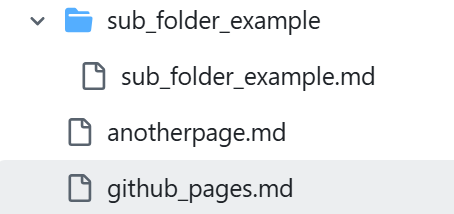
Navigating Between Pages in Your Repository
Linking to Another Page in the Same Folder
Another Page (Another Page)[anotherpage.md]
Linking to a Page in a Subfolder
Sub Folder (Sub Folder)[sub_folder_example/sub_folder_example.md]
Linking to a Parent Directory
../index.md
Linking with Absolute Paths
(Base directory is always /docs/ …)
/docs/contact.md
Setting the page permalink by including the following at the top of the page allows you to access the page as if it is in the base directory
---
layout: default
permalink: /github_pages/
---
See this page for an example:
Github Pages [Github Pages](/docs/github_pages/)
Linking to Images (Also the File Organization Used for Examples)